 Bite Club
The family meal planner app that ends “what’s for dinner?”
Plan the week together, match meals to everyone’s tastes, and have the shopping list sorted before anyone gets hungry. For iPhone and iPad.
Download on the App StoreWhy it’s hard
Why family meal planning feels so hard
Cooking dinner is rarely the difficult part. Deciding is. Every evening someone has to juggle picky eaters, a packed calendar, whatever is left in the fridge, and the fact that nobody wants the same thing twice in a row. By 5pm that decision fatigue is real, and it usually lands on one person.
A weekly meal planner for families fixes most of this in one go. You make the decisions once, at a calm moment, instead of seven times under pressure. You shop once with a proper list rather than dashing out for a missing ingredient, and you stop defaulting to the same three dinners because they’re the only ones anyone can remember.
The catch is that a plan only works if the family will actually eat it. That’s why the best family meal plans start with everyone’s tastes, not just the cook’s.
A simple routine
How to plan a week of family meals
Whether you use an app, a notebook or the back of an envelope, this routine works for most households:
- Pick a planning day. Sunday afternoon or the evening before your big shop works well. Ten minutes is usually enough.
- Start with what people like. Note each person’s favourites and hard no’s. Planning around dislikes up front saves arguments later.
- Check the calendar. Clubs, late meetings and sports nights need quick meals, leftovers or a planned takeaway rather than something ambitious.
- Mix reliable and new. Keep a few family favourites in every week and add one or two new dishes so dinner doesn’t get stale.
- Let everyone have a say. Kids who help choose dinner are far more likely to eat it. Give them a vote, not just a plate.
- Write the shopping list from the plan. Buy what the week needs and nothing more, which cuts both waste and extra trips to the shops.
Planning for picky eaters
You don’t need to cook separate meals. Look for dishes that suit most of the household, keep the “safe” favourites on rotation, and bring in new foods gradually alongside something familiar. Tracking who loves and who dislikes what makes it much easier to find the overlap.
Answering “what’s for dinner?” before it’s asked
When the week is already planned, the answer is simply on the plan. Being flexible helps too. Swapping Tuesday and Thursday is fine, and so is a planned takeaway night. The point is that nobody has to invent dinner from scratch at 6pm.
How Bite Club helps
A meal planner built for the whole family
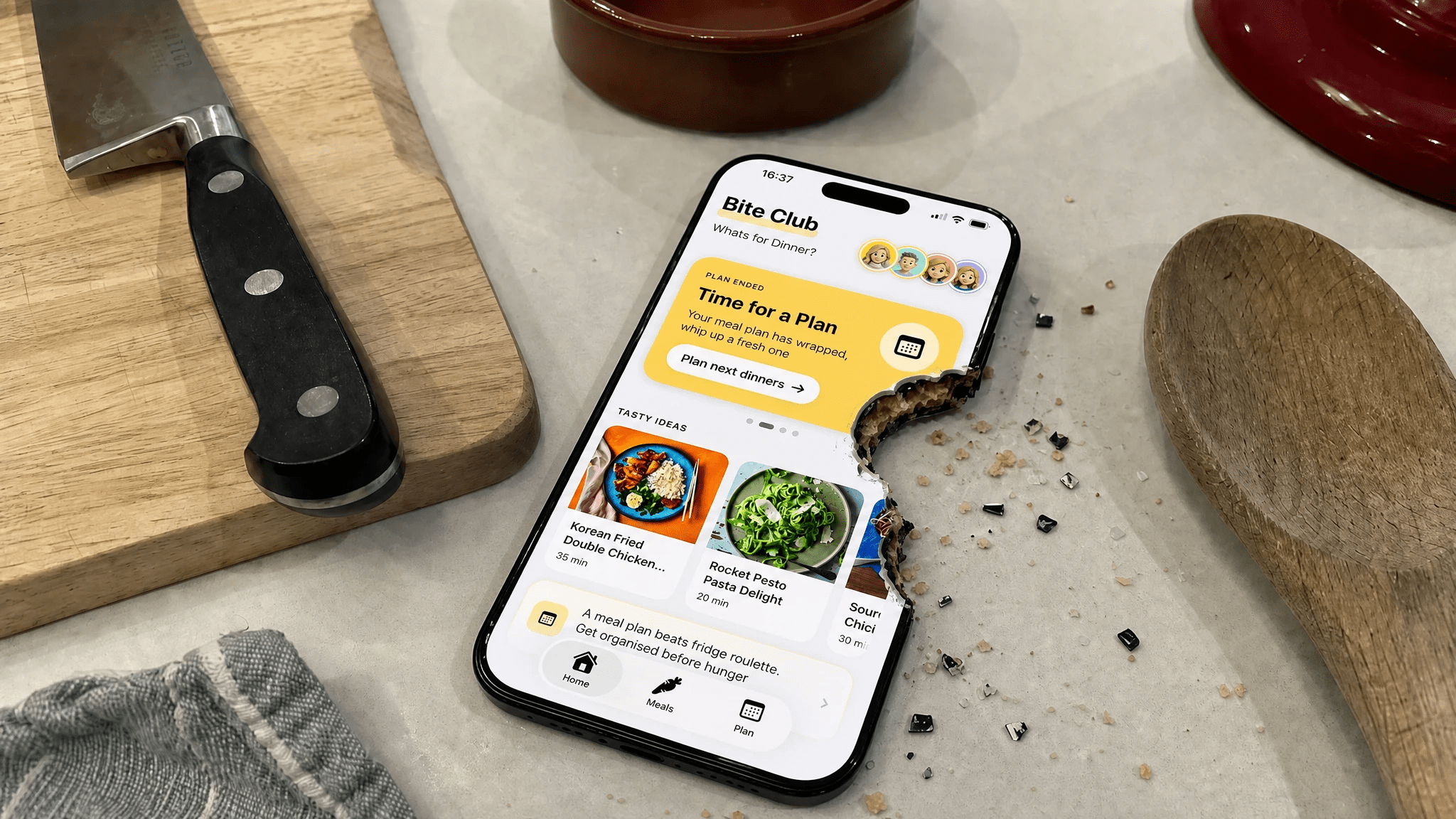
Bite Club turns that routine into something the whole household can join in with from their own phone. It’s a family meal planner app for iPhone and iPad, made by a family and tested by a real (and fussy) household.
Everyone joins the Club
Create your household’s Club, pick avatars, and share a code so everyone can join. Each person sets their Food Vibes, their loves and dislikes, so the app knows that one of you won’t touch mushrooms and another would eat pasta every night. You can also set Meal Goals such as sneaking in more veggies or making the dinner table a happier place.
Meals scored for your household
Browse over 3,000 meals, each with a Club Score: a percentage match against your household’s tastes. Less guessing, and more meals that most of the table will actually say yes to.
Suggest it, vote on it
Spot something tasty? Suggest it to the Club and everyone gets a push notification to give it a thumbs up or thumbs down. Dinner stops being one person’s solo decision.
Build the week and get the shopping list
Plan the week by mixing favourites, new finds, takeaway, delivery or eating-out nights, and House Meals, which are the household classics you already cook, such as Gran’s lasagne or your Tuesday stir-fry. Then make a shopping list for the week.
Bite Bot, for when nobody can decide
Stuck for ideas? Ask Bite Bot, the AI meal-planning sidekick, for something like “something quick with chicken”, “kid-friendly, no spice” or “five meals we’ll all like”.
Three bites
Get your family meal plan going in three steps
Create your Club
Download Bite Club, add your family members, and set what everyone likes and dislikes.
Browse, suggest, vote
Find meals that match your household and let everyone vote from their own phone.
Plan the week
Lock in the meal plan, grab the shopping list, and cook with the Club.
Make this week’s plan together.
Free to download on the App Store for iPhone and iPad (iOS 18+).
Download on the App StoreFamily meal planning FAQ
What is the best way to plan meals for a family?
Plan a week at a time, on the same day each week. Start from what everyone already likes, check the calendar for busy nights, mix a few reliable favourites with one or two new meals, and write the shopping list from the plan. Getting the whole family involved in choosing makes the plan far more likely to stick.
How does a family meal planner app help with what’s for dinner?
It moves the decision out of the 5pm rush. In Bite Club each person sets their loves and dislikes, meals get a Club Score match for the household, anyone can suggest a dinner for a family vote, and the week is planned in advance with a shopping list ready to go.
Can Bite Club handle picky eaters?
Yes. Everyone in the Club sets their own Food Vibes, so meals are scored against the whole household’s tastes. You can also save House Meals, the dishes you already know your family will eat, and drop them straight into the week.
Does Bite Club make a shopping list from the weekly meal plan?
Yes. Once you have built the week from favourites, new finds, House Meals and takeaway nights, Bite Club makes a shopping list for it.
Is Bite Club free, and which devices does it run on?
Bite Club is free to download on the Apple App Store for iPhone and iPad and requires iOS 18 or later. Bite Bot, the AI meal-planning sidekick, is an optional subscription at $4.99 / £5.99 a month with a 1 month free trial. There is no Android version.